Social Media Approval: Copy Six Stages Your Team Can Use
Build a social media approval process with six workflow stages to copy, clear roles, SLA examples, bottleneck fixes, and a managed service alternative.
By Steve Sanford · 2026-10-23

Social Media Approval: Copy Six Stages Your Team Can Use
Social media approval is a documented sign-off that every post must clear before it is scheduled or published. Done well, it keeps your brand voice consistent, cuts publishing mistakes, and leaves an audit trail that shows who approved what and when. This guide covers the stages, roles, tool features, bottlenecks, and a reusable SLA template you can copy today.
TL;DR:
- Any edit after sign off, including a changed hashtag or headline, must reopen approval; separate collaborative feedback from the final yes or no.
- Use a linear path for low risk posts, tiered review for compliance sensitive material, and conditional routing so routine content avoids unnecessary checks.
- Give creators drafting access but no publishing rights, name one final approver and a backup, and require permissions, audit logs, and post locking.
- The example deadlines, 24 hours for compliance and 12 for final approval, are adjustable; track time to publish to find the stage causing delays.
- Route AI drafts through the same human review, flag unverified facts and claims, and keep approval records tied to the exact version scheduled.
Table of Contents
- Why does an approval workflow matter for your team?
- What does an approval workflow look like?
- Which workflow type fits your team?
- Which roles and tool features enforce your process?
- How do you fix the most common approval bottlenecks?
- What does a copyable approval template with SLAs look like?
- How do you integrate approvals with AI content creation platforms?
- How do you keep brand voice consistent when humans and AI both write?
- What do successful approval workflows look like in small and mid-sized businesses?
- How do you train your team to use approval workflows with AI support?
- How does Contero enforce approvals while cutting your internal review load?
- FAQ
- Sources
Why does an approval workflow matter for your team?
A formal process pays off in several ways, and agencies feel them first because every client multiplies the risk. AgencyAnalytics points to better content quality, lower risk, and higher efficiency once approvals are systematic.
- Quality control: reviewers catch typos, broken links, factual errors, and off-brand messaging before a post goes live.
- Risk reduction: regulated content, such as health or financial claims, gets the sign-off it needs.
- Efficiency: one place for feedback ends the hunt through email threads, chat messages, and screenshots.
- Scale: predictable timelines replace last-minute fire drills as volume grows.
Scattered feedback is one of the most common reasons approval workflows fail, according to Hootsuite’s approval guide. That matches what we see: teams rarely fail because they lack opinions. They fail because opinions arrive in too many different places.
What does an approval workflow look like?
Teams can adopt the stage model that Hootsuite’s approval guide describes: ideate, draft, review, revise, approve, publish. Each stage needs one clear owner.
- Ideate: the strategist or creator proposes the topic, angle, and channel.
- Draft: the creator writes the copy and attaches visuals.
- Review: an editor or subject reviewer leaves comments in one shared space.
- Revise: the creator addresses every comment and resubmits.
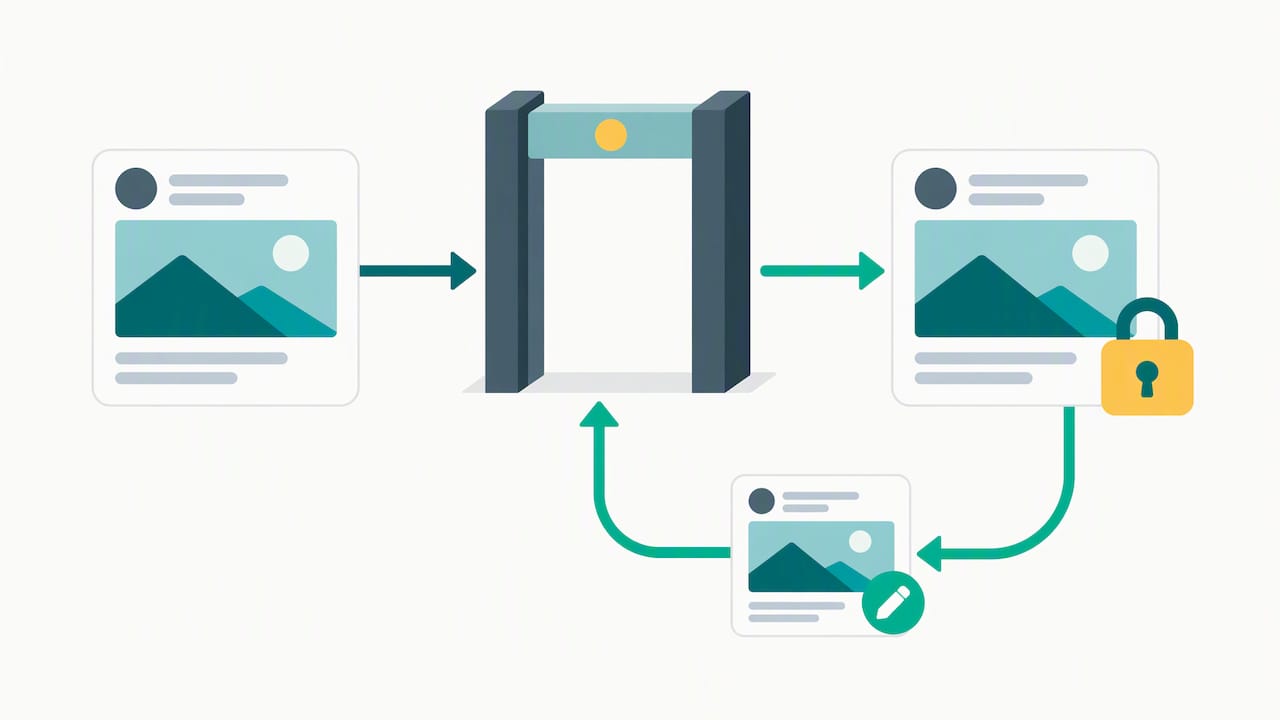
- Approve: the final approver gives a yes or no, not another round of notes.
- Publish: the publisher schedules the exact approved version.
Keep feedback and approval apart. Practitioners at Ybug recommend separating the two because feedback is collaborative and iterative, while approval is a distinct sign-off that gives the content a true final state. Mix them and a post never stops changing.
One more rule: any edit after approval reopens approval. A swapped hashtag or a tweaked headline counts. Forbes Business Council commentary frames approval as the final stop in the content journey, and a stop only works if nothing slips past it.
Which workflow type fits your team?
The right model depends on team size, posting volume, and how much compliance risk your content carries.
- Linear: one path from creator to approver. It suits small teams with low risk.
- Tiered (multi-level): several sign-offs in sequence, such as manager, then legal, then executive. Use it for compliance-sensitive or executive-signoff content.
- Parallel: several stakeholders review at the same time, so no one waits in a queue.
- Conditional: only high-risk posts, such as campaigns, claims, and paid ads, route to extra reviewers. Routine posts skip the detour.
- Hybrid: you mix the above and document which content types follow which path.
Hybrid is where many growing teams land, and the documentation is the part people skip. We also wrote about when fewer approval stages are better, because not every asset needs the same number of stages.
Which roles and tool features enforce your process?
A process on paper only holds if your tool enforces it. Start with the roles, then require the permissions and features that match them.
- Content creator: drafts and revises, cannot publish.
- Editor or reviewer: comments and requests changes.
- Compliance or legal: reviews flagged content only.
- Final approver: gives the one sign-off that matters.
- Publisher: schedules approved posts, nothing else.
Then look for the features. Hootsuite’s checklist of approval tool features points to role-based permissions, audit trails that log actions and timestamps, and post-locking that blocks changes after final approval. Platform documentation shows admins can configure approval teams and require approvals before publishing, including multiple approval tiers.
Add notifications and escalation paths so a stalled post pings a backup instead of sitting still.
Pro Tip: Test your permissions by logging in as a creator and trying to publish. If it works, your approval process is a suggestion, not a rule.
How do you fix the most common approval bottlenecks?
Several common failures cause delays, and each has a short fix.
- Scattered feedback: move all comments into one review space and give reviewers a short window to respond.
- Unclear ownership: publish an approver matrix that names one approver per content type, plus a backup for vacations and sick days.
- Post-approval edits: turn on post-locking and require re-approval for any change. Know that approvals can lapse too: Hootsuite’s help documentation explains what happens when an approval misses the scheduled publish time and how to view approval history to trace decisions.
- Slow approvers at scale: set SLAs, add parallel reviewers for stakeholders who tend to stall, and track time-to-publish so slow spots show up in numbers, not complaints.
The pattern behind all four is the same. Vague process breeds delay, and named owners with deadlines remove it. Measure time-to-publish before you change anything. You will usually find one stage, not the whole workflow, causing most of the wait.
What does a copyable approval template with SLAs look like?
Here is a starting matrix. The SLAs are illustrative examples, not benchmarks, so adjust them to your cadence.
| Stage | Role | Responsibility | Example SLA | Escalation |
|---|---|---|---|---|
| Draft | Creator | Write copy, attach assets | A short agreed window | Content lead |
| Review | Editor | Check voice, facts, links | A short agreed window | Backup editor |
| Compliance check | Legal or compliance | Verify claims | 24 hours | Compliance lead |
| Final approval | Approver | Approve or reject | 12 hours | Backup approver |
| Publish | Publisher | Schedule exact approved version | A short agreed window | Social manager |
To adapt it, shorten the SLAs if you post daily and lengthen them for weekly cadences. A small team can merge review and approval, while an agency should keep them separate for each client.
| Rule | What it means |
|---|---|
| One approver per post | Final sign-off belongs to one named person |
| Feedback before approval | Comments close before the approve step opens |
| Edits reopen approval | Any change after sign-off restarts the step |
| SLAs have owners | Every deadline has an escalation contact |
How do you integrate approvals with AI content creation platforms?
Treat AI as a drafting stage, not an approval shortcut. The draft stage in your workflow now has two parts: the AI produces a first version, and a person owns it from that point forward. That person is the creator of record, and the review stage stays exactly as strict as it was before.
A few practices keep the integration clean:
- Label AI-assisted drafts in your review space so reviewers know to check facts and claims closely. AI tools can state things with confidence that no one verified.
- Keep approval in one place. If the AI platform generates content in one tool and approvals happen in another, build a handoff rule: nothing is scheduled until the approved version is pasted or synced, and the approval record references it.
- Route AI drafts through the same roles. The final approver should not care how the draft was produced, only whether it is ready.
- Preserve the audit trail. Record who edited, who approved, and when. If your AI platform cannot export that history, log it in your scheduling tool.
- Use conditional routing. AI drafts that include statistics, health or financial claims, or competitor mentions go to compliance first.
Our own guide on content governance and AI controls goes deeper on setting guardrails before you scale. The short version: decide what the AI may draft, what it may never draft, and who signs off on both.
How do you keep brand voice consistent when humans and AI both write?
Voice drifts when no one can describe it in specifics. Start by writing a voice guide a reviewer can check against: preferred and banned words, sentence length, how formal you are, and two or three sample posts that nail it.
Then build voice into the process:
- Give the AI the guide. Feed it your voice rules and approved examples before it drafts, not after.
- Add a voice check to review. One line on the reviewer checklist, such as “Does this sound like us?”, turns a vague feeling into a required step.
- Keep a gold-standard library. Save approved posts that represent your best voice and refresh them quarterly.
- Track rejections. When approvers reject posts for tone, log the reason. Patterns tell you which rule is missing from the guide.
- Name a voice owner. One person arbitrates disputes so the guide does not turn into a debate.
Voice engines can help here. Our ConteroIQ™ brand voice engine is built to keep content aligned with a client’s specific voice across posts. Whatever tool you choose, the human reviewer still decides whether a post sounds right, because a sign-off from a person is the point of the process.
What do successful approval workflows look like in small and mid-sized businesses?
We have no named customer data to publish here, so consider two common setups, described as patterns rather than case studies.
A small local services company. One owner, one marketer, and a part-time designer. They run a linear flow: the marketer drafts, the owner approves, and the marketer publishes. The fix that mattered was a rule that the owner reviews posts in batches on a regular schedule, with a short response window. Before that, approvals arrived by text message at random hours and posts went out late or not at all.
A small agency with several clients. Each client gets a conditional path. Routine posts go from creator to account manager to publisher. Anything with a promotion, a price, or a regulated claim goes to the client for sign-off in parallel with the manager. The agency keeps an approver matrix per client, with a named backup, so a vacation never freezes a calendar.
Both examples share the same traits: named owners, short windows, one review space, and locked posts after approval. Neither needed fancy software. They needed rules people could follow without asking. If you want a plain starting point for a small team, our post on simplifying approval stages lays out how to cut steps without cutting control.
How do you train your team to use approval workflows with AI support?
Training works best when it is short, practical, and tied to real posts.
- Start with the why. Show the last mistake that slipped through, such as a wrong link or an off-tone reply, and how the workflow would have caught it.
- Walk one post through every stage. Use a live example, not slides. Let each person play their own role.
- Teach AI review habits. Reviewers should know how to spot unverified facts, generic phrasing, and claims the brand cannot back up.
- Publish a concise cheat sheet. Include the stage list, the approver matrix, and the SLAs.
- Run a short pilot. Use one channel or one client, then collect complaints and adjust.
- Review the numbers. Check time-to-publish and rejection reasons monthly, and retrain on whatever keeps recurring.
Expect resistance from fast creators who see approval as friction. Address it directly: an efficient approval step can help avoid a deleted post and an apology. Make the workflow easy to follow, and compliance follows.
How does Contero enforce approvals while cutting your internal review load?
Many teams do not want a better approval workflow so much as fewer approvals to run. That is the problem our done-for-you service solves. We pair AI-assisted drafting with mandatory human approval and a documented flow, so every post is researched, written, and checked before it reaches you. Because we handle drafting and review upstream, your team needs fewer internal approvers and a shorter queue.
Our Done-For-You Content service covers research, copywriting, design, publishing, and reporting, and ConteroIQ™ keeps the output in your brand voice. We remove the work that comes before your final review.

A sensible next step: copy the template above, run a small pilot, and if the review load is still too heavy, see how our plans work.
FAQ
What is the 70:20:10 rule for social media posts?
It is a content-mix guideline, not an approval rule. Teams often use it to split posts between core value content, shared or curated content, and promotional posts. Whatever mix you choose, every category still goes through the same approval stages.
Are people leaving social media in 2026?
We have no sourced figures on that, so we will not guess. What matters for approvals is that your channels stay active and your posts stay accurate, so a solid sign-off process is worth having regardless of platform trends.
Is social media regulated?
It depends on what you post and where. Advertising claims, health and financial statements, and endorsements can carry legal requirements, and rules differ by market. Route those posts to compliance review, and check with a qualified professional or the relevant regulator for your case.
How long should social media approval take?
Aim for the shortest window your team can hold reliably. Set review and final approval windows your team can meet reliably, then tune them to your posting cadence using real time-to-publish data.