Google Ads Landing Pages: Catch Copy and URL Errors Before Launch
Build Google Ads landing pages that match ad copy, load fast, meet policy rules, and focus on one conversion goal, with templates and prelaunch checks.
By Steve Sanford · 2026-10-22

Google Ads Landing Pages: Catch Copy and URL Errors Before Launch
A Google Ads landing page succeeds when it mirrors the ad that sent the click, drives toward one conversion goal, loads fast on mobile, and sits on a final URL that matches your display domain. Before anything else, check that your headline echoes the ad and your final URL resolves cleanly. Get those two things wrong and no amount of copy polish will save your Quality Score or your budget.
TL;DR:
- Keep tracking parameters in a separate tracking template, avoid URL shorteners and redirects across domains, and test that the declared domain matches the destination.
- On mobile, target LCP at 2.5 seconds or less, INP at 200 milliseconds or less, and CLS at 0.1 or less at the 75th percentile.
- On mobile, keep the call to action visible without scrolling and limit lead forms to a name, email address, and at most one qualifying question.
- Build separate pages for distinct ad group themes, because a page for emergency same day service should not pitch maintenance plans with the same copy.
- Run tests with a traffic split, change one element per experiment, and fix URL or speed problems before comparing headline, offer, or form variations.
Table of Contents
- Core Principles: Message Match, Single Goal, and Campaign-Aligned Content
- Technical and Policy Requirements: URLs, Tracking, and Core Web Vitals
- Page Templates and Annotated Examples You Can Copy
- A/B Testing, KPIs, and Prioritizing Experiments
- Landing Page Content Optimization Specific to Google Ads Intent
- Importance of Page Load Speed and Its Effect on Bounce Rates
- Using Trust Signals and Social Proof on Landing Pages
- Personalization Techniques for Different Audience Segments
- Integrating Google Ads with Analytics Tools for Detailed Performance Tracking
- Common Landing Page Mistakes to Avoid in Google Ads Campaigns
- Get Message-Match Content Without Writing It Yourself
- FAQ
- Sources
Core Principles: Message Match, Single Goal, and Campaign-Aligned Content
The highest-leverage fix on most landing pages costs nothing to build: matching the headline on the page to the headline in the ad. When someone clicks a promise, they expect to land on a page that repeats that promise in different words, not a generic homepage headline that forces them to hunt for relevance. This is what practitioners call message match, and it works because it collapses the gap between expectation and reality early in the visit, which is exactly the moment most visitors decide whether to stay.
Google’s own guidance backs this up directly. The Google Ads Help documentation on optimizing ads and landing pages recommends choosing a page that closely matches your ad and keywords, mirrors your call to action, stays mobile-friendly, and offers useful, original content. That last point matters more than most advertisers realize: a thin page that just restates the ad without adding anything useful still underperforms, even with perfect message match.
A single conversion goal is the second pillar. Every extra link, every top navigation bar, every footer full of blog posts and social icons gives a visitor a reason to leave before converting. Standalone campaign pages typically strip this away entirely, keeping one headline, one path, and one call to action, according to Shopify’s overview of PPC landing page design. That structural discipline is what separates a page built for an ad campaign from a page built for organic search.
Visitors also decide fast. Within the first few seconds of landing, they should be able to identify what you’re offering and what to do next. If that clarity isn’t immediately visible above the fold, the bounce happens before they ever scroll.
Here’s what belongs above that fold and in the structure below it:
- A headline that repeats or closely echoes the exact phrase from your ad.
- A subheadline that adds the one detail the ad didn’t have room for.
- Three benefit bullets, each answering “what’s in it for me,” not “what we do.”
- One visible trust signal, like a review count or a recognizable logo.
- A single, unmistakable call to action, repeated at the top and bottom of the page.
Pro Tip: Write your landing page headline before you write the ad, not after. It forces the promise to be specific enough to deliver on.
Technical and Policy Requirements: URLs, Tracking, and Core Web Vitals
Copy only matters if the page actually loads and Google’s systems can verify it does. A surprising share of wasted ad spend traces back to technical issues that have nothing to do with the words on the page.
A common one is destination mismatch: the domain in your display URL doesn’t match the domain your final URL actually resolves to. Google’s Advertising Policies Help center on final URLs and tracking templates explains that your final URL is the exact page a user lands on after clicking, and it needs to stay separate from any tracking parameters. The fix is to keep tracking information in a tracking template rather than bolting it onto the final URL, and to use the {ignore} macro so third-party parameters don’t interfere with how Google reads the destination.
Parallel tracking, which sends visitors straight to your final URL while click measurement runs in the background, is now mandatory for Search, Shopping, Display, Video, and Performance Max campaigns, but your tracking setup still needs testing. Cross-domain redirects and URL shorteners in your final URL or tracking template are a frequent, avoidable cause of disapproval, since Google’s systems need to confirm the domain a user actually lands on matches what’s declared in the ad.
Speed is the other half of the technical equation. For mobile performance, Core Web Vitals sets the bar at a Largest Contentful Paint of 2.5 seconds or less, an Interaction to Next Paint of 200 milliseconds or less, and a Cumulative Layout Shift of 0.1 or less, each measured at the 75th percentile of real user traffic. Miss those thresholds and you’re not just losing visitors to impatience, you’re working against the broader signals that shape how your ads perform.
Before turning on traffic, run the landing page through Google’s own testing tool, which flags issues like “Landing page has URL mismatch” or “Page not found” at the account, campaign, ad, and keyword level. A few minutes here catches problems that would otherwise surface as disapprovals or, worse, silently wasted clicks.
Quick technical checklist:
- Confirm the final URL domain matches the display URL domain exactly.
- Keep all tracking parameters in the tracking template, not the final URL field.
- Avoid shorteners or cross-domain redirects anywhere in the click path.
- Test LCP, INP, and CLS on a real mobile device, not just a desktop preview.
Page Templates and Annotated Examples You Can Copy
Templates can cover many Google Ads use cases, and each can be adapted rather than built from scratch.
- Ecommerce single-product page. Headline states the product and its core benefit in one line. Subheadline adds a specific detail like material, size range, or guarantee. Hero image shows the product in use, not on a white background. Three benefit bullets cover what the product does, who it’s for, and what makes it different. The CTA reads “Add to Cart” or “Buy Now,” placed above the fold and repeated after the product description.
- Lead-generation form for B2B or service businesses. Headline names the outcome the visitor wants, not the service category. Subheadline specifies who it’s for. Benefit bullets focus on speed, expertise, and what happens after they submit the form. The CTA button says something concrete like “Get My Quote” rather than “Submit,” and the form asks for the minimum fields needed to qualify the lead.
- Trial signup for SaaS or demo requests. Headline promises the specific result the tool delivers. Subheadline removes a common objection, like “No credit card required.” Benefit bullets show the before-and-after of using the product. The CTA says “Start Free Trial” or “Book a Demo,” and trust signals sit directly below the fold, not buried at the bottom.
The connective tissue across all three is that every page element answers to something specific in the ad. If your ad headline promises “Same-Day Quotes,” your landing page headline should contain those same words, and your CTA verb should match the action implied by the ad’s own call to action. A mismatch here, even a subtle one, creates the moment of doubt that sends a visitor back to the search results.
On mobile, the layout needs to compress without losing that structure:
- Stack the hero image above the headline, not beside it.
- Keep the CTA button visible without scrolling, ideally sticky at the bottom of the screen.
- Trim trust signals to one strong element instead of three weaker ones.
- Cut form fields to the absolute minimum: name, email, and one qualifying question at most.
Turning an existing homepage or product page into a campaign-specific landing page usually involves these changes: strip the top navigation, rewrite the headline to match the ad, remove any links that don’t lead to the conversion action, and compress the page length so the CTA appears within the first two screens on mobile.
A/B Testing, KPIs, and Prioritizing Experiments
Every test should start with a plain hypothesis: change one element, predict one outcome, and name the metric that will prove or disprove it before you launch. “Changing the CTA from ‘Learn More’ to ‘Get Started’ will increase form completions because it names the action more specifically” is a testable claim. A vague goal like “improve the page” isn’t.
The KPIs that matter most for a Google Ads landing page are conversion rate, conversion volume, bounce rate, time on page, and the Core Web Vitals scores covered earlier. Page speed ties into the landing page experience part of your Quality Score. Conversions themselves don’t, though Google suggests conversion rate as a useful proxy for landing page experience. Google’s guidance on Quality Score frames it as a diagnostic built from expected clickthrough rate, ad relevance, and landing page experience, and a landing page experience rated “Below average” is a direct signal that your page content needs to better match what the ad promises. Making the page more relevant and useful to the people who click is what lifts this rating, since that is what Google’s landing page experience measures.
A sensible order of operations when something’s underperforming:
- Fix destination and technical issues first. A broken or mismatched URL invalidates every other test.
- Address page speed next, since a slow load undermines every other optimization downstream.
- Test headline and offer changes third, since message match has the largest effect on conversion once the page actually works.
- Tackle layout and form-field tweaks last, as these tend to produce smaller, incremental gains.
Run experiments with proper traffic split rather than switching a page live and comparing week over week, since seasonality and campaign changes will confound the results. Give a test enough volume to reach a meaningful sample before calling a winner, and roll a validated change into your wider campaigns only after it holds up across audience segments.
Pro Tip: If you’re not sure which single change to test first, test the headline. It’s the fastest way to confirm whether your message match problem is real.
Landing Page Content Optimization Specific to Google Ads Intent
Search intent and ad intent aren’t always the same thing, and that distinction shapes how a landing page should read. Someone who clicked a search ad already typed a specific query, so the page needs to answer that exact query in the first few lines rather than easing into a broader pitch. A display or social ad click carries weaker intent, so the landing page needs to do more work establishing relevance before asking for a conversion.
Google’s own framing in its landing page documentation ties this directly to Quality Score: landing page experience accounts for usefulness, relevance, ease of navigation, and whether the page meets what the ad led a visitor to expect. Content written for organic search rankings, built around broad keyword coverage and long explanations, usually works against this, since Google Ads intent rewards narrow focus over comprehensive coverage.
The practical fix is writing page copy around the exact match type and keyword theme of the ad group it supports, rather than one page trying to serve five different ad groups. A page built for “emergency plumber same day” should read differently than one built for “plumbing maintenance plans,” even if both services come from the same business.
Importance of Page Load Speed and Its Effect on Bounce Rates
Speed isn’t a nice-to-have on a Google Ads landing page, it’s a gate. A visitor who clicked a paid ad has already shown intent, and a slow-loading page burns through that intent before they see a single word of your copy. Core Web Vitals sets the practical benchmark, and Google lists faster loading among the ways to improve landing page experience, part of the ad quality that affects your ad position and cost per click.
The bounce-rate effect compounds on mobile, where a large share of Google Ads clicks originate and where network conditions are less predictable than desktop. A page that takes longer to load on a mobile connection can lose visitors before the hero image even renders.
The fix isn’t exotic: compress hero images, defer non-critical scripts, and avoid heavy animation libraries on pages built specifically for paid traffic. A landing page doesn’t need the same visual richness as a flagship homepage. It needs to load fast, say one thing clearly, and get out of the way.
Using Trust Signals and Social Proof on Landing Pages
A visitor arriving from an ad has no history with your business, so a landing page has to build credibility in seconds rather than relying on brand recognition built over time. Trust signals do that work efficiently: a review count, a recognizable client logo, a specific guarantee, or a certification badge placed near the CTA all reduce the hesitation that keeps someone from converting.
The placement matters as much as the signal itself. A trust element buried at the bottom of a long page does nothing for the visitor deciding whether to scroll past your headline. Put one strong signal directly below the fold, close to the first CTA, rather than scattering several weaker ones throughout the page.
Specificity beats volume here. “Trusted by thousands” reads as filler, while a named client, a specific guarantee term, or an exact review count reads as real. If a claim can’t be made specific, it’s often better left out than stated vaguely.
Personalization Techniques for Different Audience Segments
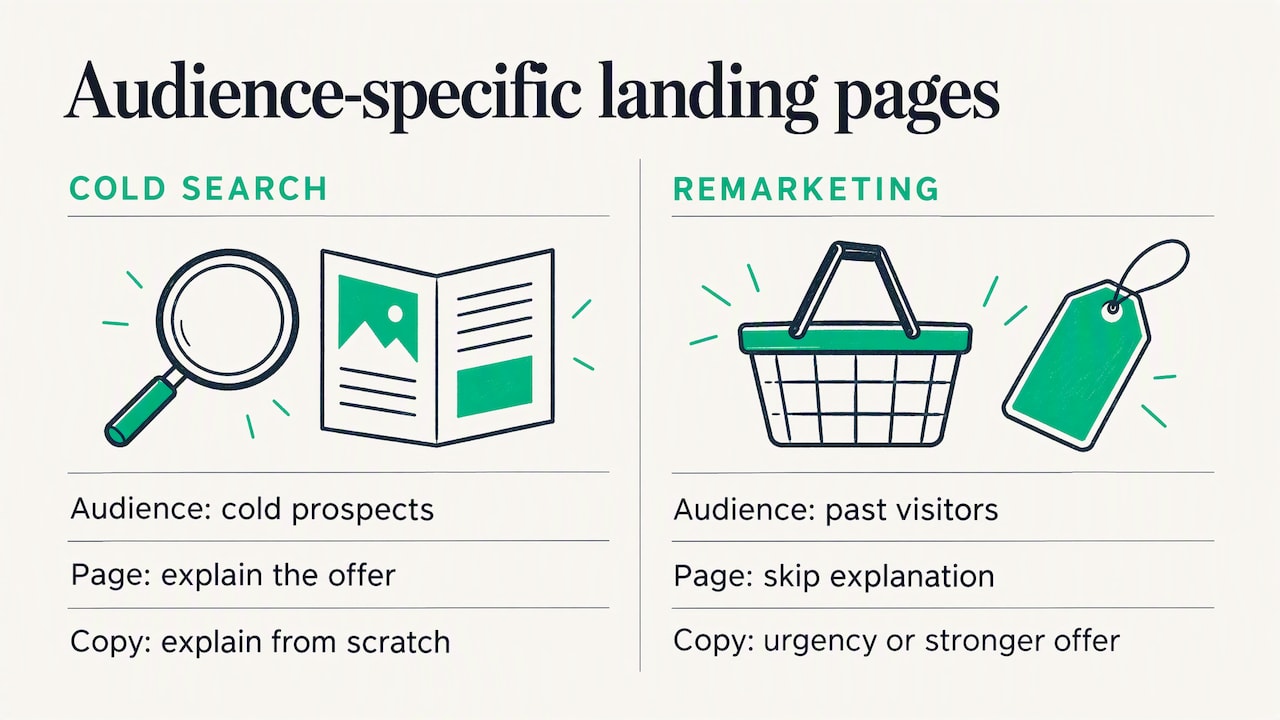
Google Ads campaigns often target several distinct audiences from the same account, which means a single landing page rarely serves everyone equally well. A campaign targeting cold prospects through search needs a page that explains the offer from scratch, while a remarketing campaign targeting people who already visited your site can skip that explanation and go straight to urgency or a stronger offer.
The simplest form of personalization is matching page copy to campaign structure: one headline variant per ad group theme, swapped through dynamic text insertion or simple page duplication rather than one page trying to flex for every keyword. A service business running separate campaigns for residential and commercial customers benefits from two landing pages with different proof points and benefit framing, even if the underlying service is the same.
Geographic and device-based personalization are the next layer, useful when a business serves multiple regions or sees a meaningful split between mobile and desktop conversion behavior. The goal in every case is the same one covered under message match: the page should feel like a direct continuation of the exact ad that produced the click, not a generic page asked to serve every click equally.
Integrating Google Ads with Analytics Tools for Detailed Performance Tracking
A landing page that converts well in isolation is only half the picture. Connecting your Google Ads account to an analytics platform lets you see what happens after the click, not just whether a conversion fired. That connection also feeds the KPIs covered earlier: bounce rate, time on page, and scroll depth all come from analytics data layered on top of conversion tracking.
Setting this up correctly means confirming that your conversion actions in Google Ads align with the actual goal you’re measuring in analytics, whether that’s a form submission, a purchase, or a scheduled call. A mismatch between what Google Ads counts as a conversion and what your analytics platform tracks as a goal produces reporting that looks fine on the surface while hiding real problems underneath.
This is also where tag management becomes relevant. Firing conversion tags correctly, testing them before launch, and confirming attribution windows match your sales cycle all prevent the kind of measurement gaps that make it impossible to know which landing page change actually moved the needle.
Common Landing Page Mistakes to Avoid in Google Ads Campaigns
The same handful of mistakes show up across most underperforming Google Ads accounts. Sending traffic to a homepage instead of a dedicated landing page is the most frequent one, since a homepage is built to serve every visitor equally and ends up serving paid traffic poorly.
Leaving full site navigation on a campaign landing page is another. Every link out is a potential exit before the conversion happens, and Google’s own landing page guidance asks you to make the action you want quick and easy to take, without making people hunt around.
Other recurring issues include mismatched final URLs and display URLs, pages that ignore Core Web Vitals thresholds on mobile, forms that ask for more information than the offer justifies, and CTA copy that doesn’t match the verb used in the ad itself.
Get Message-Match Content Without Writing It Yourself
Writing content for every ad group in a voice that still sounds like your business is exactly the kind of repetitive work our Done-For-You Content service was built to absorb. Our Contero IQ™ engine studies your existing brand voice so new content and campaign assets read like you wrote them, not like a template. Every piece still goes through human approval before it reaches you. Done-For-You is quoted on a short call, and self-serve plans start at $79 a month on our pricing page.
FAQ
What makes a landing page good for Google Ads specifically?
A good Google Ads landing page matches the headline and offer in the ad that sent the click, focuses on one conversion goal, and loads quickly on mobile. Google’s own landing page guidance also stresses that the page should feel like a direct continuation of the ad rather than a generic page serving unrelated traffic.
How does landing page experience affect Quality Score?
Landing page experience is one of three components of Quality Score, alongside expected clickthrough rate and ad relevance. A “Below average” rating signals that the page content needs to better match what the ad promised, which can raise costs and lower ad position even with strong creative.
What Core Web Vitals thresholds should a landing page meet?
For mobile performance, aim for a Largest Contentful Paint of 2.5 seconds or less, an Interaction to Next Paint of 200 milliseconds or less, and a Cumulative Layout Shift of 0.1 or less, each at the 75th percentile, according to Core Web Vitals guidance. Falling short of these can hurt both user conversion and ad performance.
Why does my final URL cause a destination mismatch error?
A destination mismatch usually happens when the domain in your final URL doesn’t match your display URL, often because of a cross-domain redirect or a URL shortener in the click path. Google Ads Help recommends keeping tracking parameters in a separate tracking template and testing the final URL directly before launch.